
Citrix Files for MobileIron20.9.1 - App Store
You'll be able to see results in few seconds.
Publisher Description


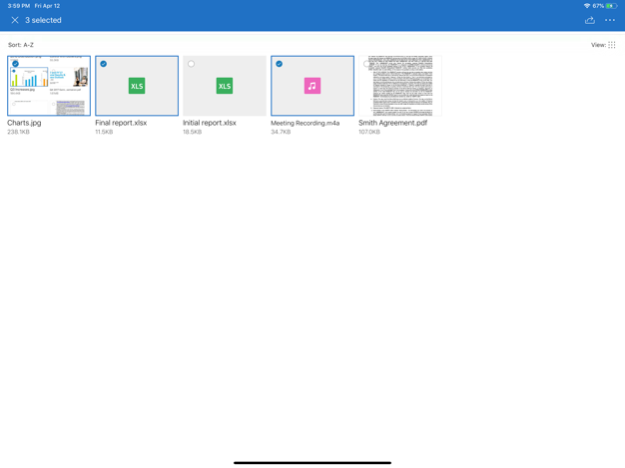


Citrix Files for MobileIron helps people exchange files easily, safely and professionally, while integrating seamlessly with MobileIron managed applications.
Designed for business, Citrix Files is a file manager that offers secure data sharing and storage, customizable usage and settings, award-winning customer service and tools that allow you to collaborate more easily and get your work done from any device — any time, anywhere. Citrix Files’ leading performance lead it to be named the 2015 Best in Biz Gold Award winner.
Citrix Files for MobileIron protects and simplifies users’ workflows by reducing the need to switch from one application to another. From within the Citrix Files app, a user can launch open and navigate files across other MobileIron applications and immediately begin editing or sharing those files.
Any MobileIron users without a Citrix Files account can create a free account on our website
and get started!
With your Citrix Files account and app, you can:
Access
-Access files and folders located in your Citrix Files account.
-Edit files located in your Citrix Files account (not available on all plans).
-Download and upload files between your Citrix Files account and mobile device.
-Sync files in your Citrix Files account from all of your devices.
Share
-Share or sync multiple files with multiple users at once.
-Email files from your Citrix Files account, mail or Gmail apps on your mobile device.
-Request files and provide secure links for recipients to upload files to your Citrix Files account.
Manage
-Set custom access permissions to files and folders for individual users.
-Specify a passcode for additional protection for your Citrix Files account.
-Add users to existing folders in your Citrix Files account.
-Use your Citrix Files account as a secure file manager.
-Remotely wipe or lock your Citrix Files account in the event of a lost or stolen mobile device.
Citrix Files will request access to device capabilities or data to enable advanced features, including:
Contacts
This allows Citrix Files to let you choose co-workers among the contacts in your phone address book.
Camera
This allows Citrix Files to let you capture a photo or video for upload.
Microphone
This allows Citrix Files to let you record audio for upload.
Photos and Media Library
This allows Citrix Files to let you choose photos and videos from your Library to upload.
Sep 15, 2020
Version 20.9.1
Bug Fixes and Quality Improvements
About Citrix Files for MobileIron
The company that develops Citrix Files for MobileIron is Citrix Systems, Inc.. The latest version released by its developer is 20.9.1.
To install Citrix Files for MobileIron on your iOS device, just click the green Continue To App button above to start the installation process. The app is listed on our website since 2020-09-15 and was downloaded 0 times. We have already checked if the download link is safe, however for your own protection we recommend that you scan the downloaded app with your antivirus. Your antivirus may detect the Citrix Files for MobileIron as malware if the download link is broken.
How to install Citrix Files for MobileIron on your iOS device:
- Click on the Continue To App button on our website. This will redirect you to the App Store.
- Once the Citrix Files for MobileIron is shown in the iTunes listing of your iOS device, you can start its download and installation. Tap on the GET button to the right of the app to start downloading it.
- If you are not logged-in the iOS appstore app, you'll be prompted for your your Apple ID and/or password.
- After Citrix Files for MobileIron is downloaded, you'll see an INSTALL button to the right. Tap on it to start the actual installation of the iOS app.
- Once installation is finished you can tap on the OPEN button to start it. Its icon will also be added to your device home screen.
Program Details
System requirements
Download information
Pricing
Version History
version 20.9.1
posted on 2020-09-15
Sep 15, 2020
Version 20.9.1
Bug Fixes and Quality Improvements
version 20.9.1
posted on 2020-09-15
Sep 15, 2020 Version 20.9.1
Bug Fixes and Quality Improvements
version 20.9.1
posted on 2020-09-15
15 Sep 2020 Version 20.9.1
Bug Fixes and Quality Improvements
version 20.9.0
posted on 2020-09-08
Sep 8, 2020 Version 20.9.0
Bug Fixes and Quality Improvements
version 20.3.0
posted on 2020-04-16
Apr 16, 2020 Version 20.3.0
Bug Fixes and Quality Improvements
version 7.8.1
posted on 2019-04-15
Apr 15, 2019 Version 7.8.1
Bug fixes and quality improvements
version 4.8.1
posted on 2016-10-14
version 20.3.0
posted on 1970-01-01
2020年4月16日 Version 20.3.0
Bug Fixes and Quality Improvements
version 7.8.1
posted on 1970-01-01
2019年4月15日 Version 7.8.1
Bug fixes and quality improvements
version 7.8.1
posted on 1970-01-01
15 Nis 2019 Version 7.8.1
Bug fixes and quality improvements
Disclaimer
Official App Store Link
We do not host Citrix Files for MobileIron on our servers. We did not scan it for viruses, adware, spyware or other type of malware. This app is hosted by Apple and passed their terms and conditions to be listed there. We recommend caution when installing it.
The App Store link for Citrix Files for MobileIron is provided to you by apps112.com without any warranties, representations or guarantees of any kind, so access it at your own risk.
If you have questions regarding this particular app contact the publisher directly. For questions about the functionalities of apps112.com contact us.
